
⏱ 3 min read
NOIR Generator DCTL: Bring Cinematic Black-and-White Looks to DaVinci Resolve
If you've ever tried to nail that moody, high-contrast black-and-white aesthetic in post-production, you know it takes more than just desaturating your footage. The NOIR Generator DCTL for DaVinci Resolve is a purpose-built tool designed to take the guesswork out of creating authentic film noir visuals — and it's turning heads in the colour grading community.
Whether you're crafting a short film, a moody music video, or cinematic content for YouTube, this DCTL (DaVinci Color Transform Language) plugin slots seamlessly into your DaVinci Resolve workflow and delivers results that would otherwise take hours of manual node work to achieve.
---
What Is the NOIR Generator DCTL?
A DCTL is essentially a custom colour science script that runs natively inside DaVinci Resolve's colour page. Unlike a basic LUT, DCTLs are fully parametric — meaning you can adjust values on the fly, dial in intensity, and fine-tune your look without baking anything in permanently.
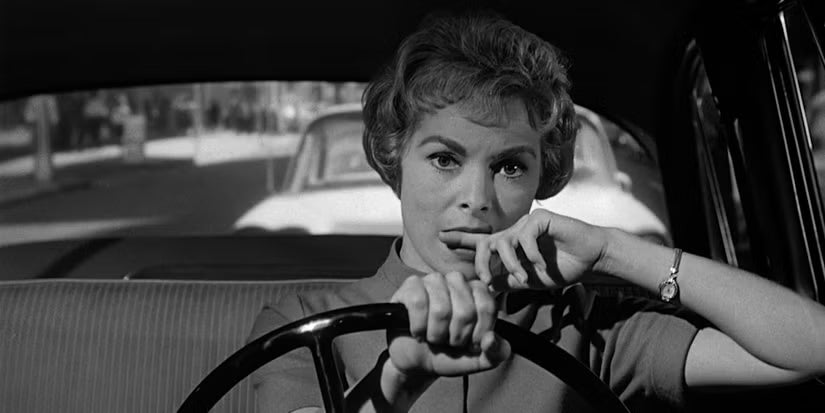
The NOIR Generator DCTL is specifically engineered to simulate the tonal qualities of classic noir cinematography: deep blacks, crushed shadows, luminous highlights, and that unmistakable film grain texture. Rather than simply removing colour, it remaps luminance values the way black-and-white film stocks actually respond to light — giving you a far more organic and visually compelling result.
It's the kind of tool that reminds you why DaVinci Resolve remains the go-to platform for serious colourists. The ability to run custom DCTLs is one of those professional-grade capabilities that separates Resolve from consumer-level editors.
---
How to Use It in Your DaVinci Resolve Workflow
Getting the NOIR Generator DCTL up and running is straightforward:
1. Download the DCTL file and drop it into your DaVinci Resolve DCTL folder (found in the LUT directory on both Mac and Windows). 2. Restart DaVinci Resolve to allow the system to index the new file. 3. On the colour page, add a new node and apply the DCTL via the Effects panel under "ResolveFX" or directly through the DCTL filter option. 4. Adjust the parameters — contrast curves, grain intensity, highlight rolloff — until you land on the look you're after.
One important note: DCTL support requires DaVinci Resolve Studio. If you're still on the free version, this is a strong reason to consider making the upgrade. You can buy DaVinci Resolve Studio from mediaTITANS and unlock the full spectrum of professional colour tools, including DCTL compatibility.
---
Why Film Noir Aesthetics Are Trending Again
From streaming drama series to independent festival films, the film noir visual language is enjoying a genuine renaissance. High-contrast monochrome storytelling feels timeless, emotionally charged, and — crucially — incredibly distinctive in an era of over-saturated content feeds.
For content creators looking to stand out, mastering a signature aesthetic is a real competitive advantage. Tools like the NOIR Generator DCTL make it faster and more accessible than ever to build that visual identity directly inside your DaVinci Resolve colour page, without needing a dedicated DIT or a Hollywood-sized budget.
---
Is DaVinci Resolve Studio Worth It for Tools Like This?
Yes — absolutely. The free version of DaVinci Resolve is remarkably powerful, but DCTL support, noise reduction, and a host of other professional features are locked behind the paid licence. For anyone serious about colour grading, the one-time cost of a DaVinci Resolve Studio licence pays for itself quickly in workflow efficiency and creative capability.
---
Start Grading Like a Pro
The NOIR Generator DCTL is a fantastic example of how the DaVinci Resolve ecosystem continues to grow through community-driven tools and plugins. It's practical, visually powerful, and a genuine time-saver for anyone chasing that cinematic monochrome look.
If you're ready to take full advantage of DCTLs and everything else the professional toolset has to offer, get DaVinci Resolve Studio from mediaTITANS and step up your colour grading game today.
---
Free Download
DaVinci Resolve: Free vs Studio
Get the complete 2026 comparison guide. Find out exactly what you get with the free version, what Studio unlocks, and whether the upgrade is worth it for your work.
📄 Get the Free Guide →