
⏱ 3 min read
DaVinci Resolve Is the Adobe Lightroom Replacement You Didn't Know You Needed
If you've been paying for Adobe Lightroom out of habit rather than necessity, you're not alone. Millions of photographers and video creators stay locked into subscription software simply because they don't know a powerful alternative exists. But here's the thing — DaVinci Resolve has quietly evolved into one of the most capable colour grading and image processing tools on the planet, and it's making a serious case as a Lightroom replacement for creative professionals.
Let's break down why so many creators are making the switch.
---
The Colour Science Behind DaVinci Resolve Is World-Class
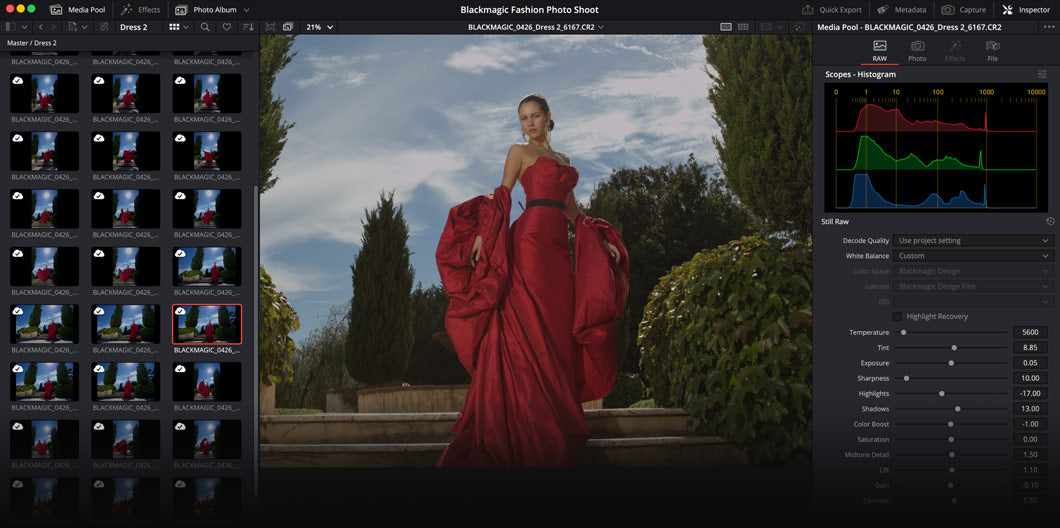
DaVinci Resolve didn't earn its reputation in Hollywood by accident. Its colour grading engine was originally built for big-budget film productions, and that same technology is now available to anyone — for free. The Colour page inside Resolve gives you access to primary and secondary colour wheels, curves, scopes, HSL qualifiers, and node-based grading that puts Lightroom's adjustment sliders to shame.
For photographers and content creators who want precise, repeatable control over how their images and footage look, this level of colour science is a genuine game-changer. Whether you're processing RAW stills or grading log footage, Resolve handles both with a level of depth that feels professional from the first session.
---
A Subscription-Free Workflow That Actually Works
One of the biggest frustrations with Adobe's ecosystem is the ongoing cost. Lightroom Classic, Photoshop, and Premiere Pro together can easily cost $60–$80 per month. DaVinci Resolve offers a genuinely powerful free version that covers most creators' needs, and the one-time purchase of DaVinci Resolve Studio unlocks even more advanced features — without any recurring fees.
This shift to a perpetual licence model is resonating with creators who are tired of renting software. You buy it once, and it's yours. For freelancers, small studios, and independent filmmakers managing tight budgets, that difference in cost model is enormous over a 2–3 year period.
---
Beyond Video Editing: Resolve as a Full Creative Hub
What makes DaVinci Resolve stand out from every other Lightroom alternative is that it doesn't stop at photo or colour work. It's a complete post-production platform built around five dedicated pages:
- Cut & Edit — for fast, intuitive video editing
- Colour — professional-grade grading tools
- Fairlight — a full digital audio workstation
- Fusion — node-based motion graphics and VFX
- DaVinci AI — magic mask, scene cut detection, voice isolation, and more
---
Who Should Make the Switch?
If you're a YouTuber who colour grades footage and edits in the same timeline, Resolve is a natural fit. If you're a photographer who also shoots BTS video content, Resolve handles both. If you're a filmmaker looking to consolidate your toolkit and cut subscription costs, this is one of the smartest moves you can make in 2025.
The learning curve is real — Resolve is a deep piece of software — but the investment pays off quickly. There's a thriving community, excellent official training, and a growing library of free tutorials online to help you get up to speed fast.
---
The Verdict: Time to Break Up With Lightroom?
DaVinci Resolve has earned its place as a legitimate, professional-grade alternative to Adobe Lightroom — and then some. Its colour tools are superior, its workflow is broader, and its pricing model is far more sustainable for independent creators.
If you're ready to step up your colour work and take control of your entire post-production pipeline, now is the perfect time to explore DaVinci Resolve Studio at Media Titans — the professional version that unlocks Resolve's full potential with a single, one-time purchase.
Your subscription fees could be a thing of the past.
---